Introducing Concilium
The RSM side-quest that became its own project, and helped build itself.
In case you missed it, Automattic employees have been taking part in Radical Speed Month (or RSM), a company-wide experiment in two-person, full-autonomy shipping. While my actual RSM projects have been heads-down in WordPress documentation health tooling and WooCommerce email diagnostics (more on both of those in a moment), this post is all about the tool I built to help me during RSM.
That tool is Concilium, and it’s available as an open-source project.
What is Radical Speed Month, Anyway?
If you’re not an Automattician reading this from the inside, here’s the quick version: RSM is a one-month experiment where you pair up with someone, pick a project, and ship it. The brief was essentially: pair up and ship something in a month. Any project, no approvals required.
Now my problem is not one of shipping, my work requires me to ship something almost daily, be it a code demo, documentation update, written article, video walkthrough, up to and including live streams. However, the thought of working on something very different, with someone else, was extremely interesting. My problem? I’m terrible at coming up with ideas.
Fortunately my wonderful colleagues aren’t and so this month I’m actually involved in two RSM projects.
Now that I think about it, it probably explains why I needed something to help me manage it all…
The first is WP Docs Health Monitor, which I’m building with JuanMa Garrido, one of my fellow Developer Advocates at Automattic, and the person I reach out to the most when I need JavaScript help. JuanMa noticed that the Block Editor Handbook has 200+ pages of documentation that are constantly drifting out of date as APIs and parameters change. His idea was a tool that automatically compares documentation against source code, produces a health score dashboard with specific issues flagged, and gives contributors a prioritised list of things to fix — all running on a weekly schedule so we catch outdated docs before users do.
JuanMa reached out to me and I jumped at the opportunity to work with him, even though the initial plan uses technologies (TypeScript anyone!) that I’m very unfamiliar with.
The second is Woo Email Health, which I’m working on alongside colleague, fellow Capetonian (even though he’s originally from Belgium, but we forgive him for his past) and WordCamp organiser, and one of my oldest friends in the local WordPress space, Job Thomas. It’s a Woo-native Email Health system built directly into WooCommerce, a three-part solution consisting of a built-in email activity log, a health warning system that detects when email flows look broken, and deliverability risk checks that flag dodgy sender configurations before merchants discover the hard way that their emails have been silently failing.
They idea came to Job when he made an order on a WooCommerce site in South Africa and two weeks later hadn’t received a single thing from the merchant. No order confirmation, no reply to his emails, nothing. He eventually got through via WhatsApp, otherwise he would’ve flagged the site as fraudulent to its payment provider. That’s the problem in a nutshell: WooCommerce often can’t tell you what happened to your emails. Job’s work as head of WooCommerce support showed him that the email troubleshooting doc is referenced in 1.4% of all Woo support interactions in the past 30 days — and our goal is to drive that below 1%.
Both projects are good, meaty work. But the mechanics of working on them both for RSM — running multiple Agentic agent sessions in parallel across two separate projects, context-switching between tasks, keeping track of what each agent was doing — immediately surfaced a problem I hadn’t anticipated.
Managing multiple agents and code repositories is taxing
At the moment I have two main agentic coding tools I use on every project, GitHub Copilot and Claude Code. I use the GitHub Copilot agent in the GitHub web interface, assigning the agent to GitHub issues, and letting it run in the cloud inside Github Actions.
As a fan of working locally in the terminal, Claude Code is my default tool for local agenting coding. The terminal is lightweight and if all you’re doing is prompting an agent, more than sufficient.
I’ll usually pair the two by letting Copilot act as a “junior” developer, spinning up the first version of something, and then ask Claude Code to review it and submit feedback back to Copilot. This way I never hit my daily usage limits, as I’m sharing the work across the two agentic implementations.
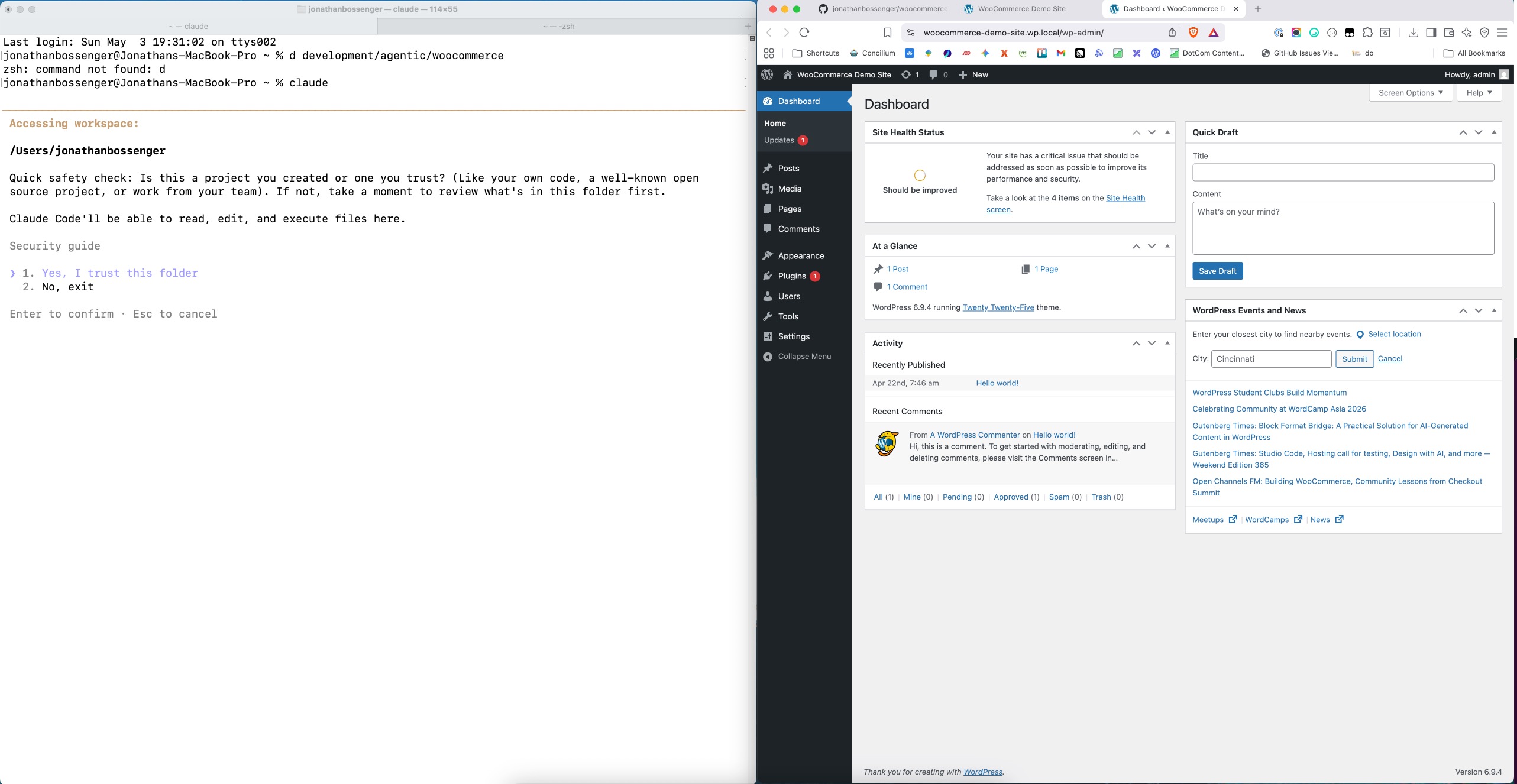
This means I’ll usually have one terminal instance open, with a couple of open tabs, one for regular terminal commands, and the one or two more for Claude Code, usually no more than 3. The Claude Code tabs might be working on two different things simultaneously, including reviewing PRs or writing documentation. Sometimes I might just ask Claude to fix smaller items locally and push them to the PR
The other application I’ll have open is a browser instance, also with a couple of open tabs, also usually no more than 3. One is usually pointing to the GitHub repository, where I’m doing things like creating new issues to assign to GitHub Copilot, or reviewing PRs. The other might be manually testing new features, and the third is usually for further research on something.
All of this fits nicely onto my 32 inch monitor, with the two different application windows side by side.
Every now and then I might open my IDE (PhpStorm) to look at some code, but lately, more often than not, I’m doing this in the GitHub PR interface.
The one downside to this is that I still have to tab between terminal sessions and browser tabs. I know there are solutions for this, but for now it works.
However, ramp this up to two (or more) projects, and it gets overwhelming pretty fast. Two projects means up to six tabs per open application (terminal and browser) and if I want to try and do anything else in the other, that’s more tabs. The alternative is separate terminal and browser windows per project, which is also just as unmanageable.
So I started wondering about how I could streamline this process and bring everything into (or trigger it from) a single browser dashboard.
Reviewing the existing landscape
As I thought about this problem, I started looking into existing solutions towards the end of the first RSM week. Apparently there are already some genuinely interesting tools in this space, and several of my colleagues were already experimenting with them. Two browser based tools I looked at where Paperclip and Multica, and there are a bunch of desktop apps, including Conductor, Superset, and EmDash.
The problem I had with all of these solutions is that seemed overcomplicated, with a lot of extras I didn’t need.
What I needed was simpler and more focused: a personal, lightweight dashboard to monitor and manage multiple individual agent sessions while I’m working solo.
What I envisioned was a series of agent “cards” that allowed me to select a local working directory, a locally installed and preconfigured coding agent, and start the agent session, in the browser. From there, I should be able to run arbitrary terminal commands, as well interact with the working directory’s GitHub repository, without needing to keep anything active but the original agent instance.
Something that showed me, at a glance, what each agent was working on, but also let me interact with the pieces of the project around it, from one central place.
So, like any other developer using AI these days, I built my own thing.
Introducing Concilium
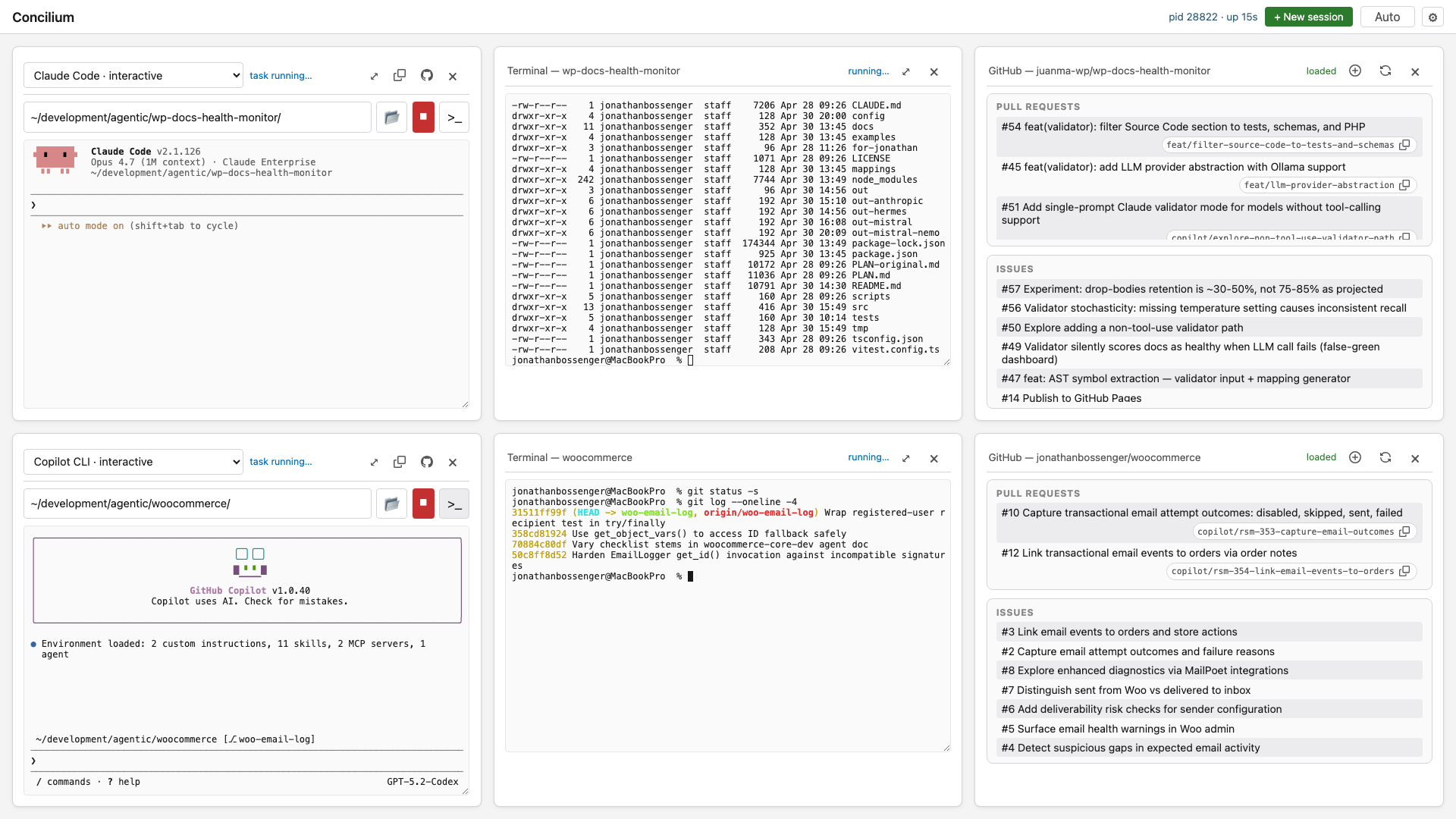
Concilium (Latin for council, as in a council of agents) is a vanilla HTML/CSS/JS application for monitoring and managing multiple AI coding agent sessions from a single interface. It’s opinionated, lightweight, and built specifically for the workflow of a developer running several coding agents, (Claude Code, Copilot, Codex or equivalent) sessions in parallel, with revision control managed in Github.
The primary area of interaction is the agent card. You choose a preconfigured local agent, a working directory, and click start. It starts an xterm terminal emulator instance, and you can start talking to your agent right away.
If you need to run any arbitrary terminal commands, you can trigger a new vanilla xterm instance at the click of a button. This will create a new card with the terminal ready to run commands inside the working directory. It supports all the default terminal features like tabbed autocomplete and terminal history searching. Once you’re done, close the terminal card. It’s easier to reopen it later than to keep it hanging around
Need to check on the status of your project’s GitHub issues or pull requests? Simply click the GitHub button and see a list of all open pull requests and issues. There are also buttons available to create a new issue, or copy the PR branch, to share with your agent if you want to pull it to test locally. Like the terminal card, once you’re done with the GitHub card, close it, and reopen it later when you need it.
Some additional quality of life features include the option to expand a specific card to fit the full viewport, for more focused work, clone an existing agent card to spin up a new task on the current project, and the ability to arrange cards by dragging and dropping.
Concilium supports light, dark and auto layout modes to suit your preferences, and the settings page allows you to define multiple pre configured agents to meet your needs. It also has a place for a GitHub token, to support authenticated API requests.
Getting Started
The project lives at https://github.com/jonathanbossenger/concilium. Getting set up is as straightforward as cloning the repo, installing the dependencies, and starting the concilium server. You can even install it to auto start as a user service. All the details are in the project’s README.
Why Build This When Existing Tools Exist?
One of the things I discovered through RSM is that the speed of iteration matters as much as the quality of the end result. Every minute I spent wrestling with a tool that didn’t quite fit my workflow was a minute not spent shipping.
The reality is that the agent orchestration space is moving incredibly fast — Paperclip, Multica, GitHub’s own Agents tab, and a dozen others have all shipped or iterated significantly just in the past month. Each of them is optimised for a particular workflow or team structure. The gap I found — a simple, personal, lightweight session manager for a solo developer running parallel agent sessions — felt small enough that I could fill it in a few days, and specific enough that the existing tools weren’t going to get me there without significant adaptation.
It’s something I’ve tried to maintain ever since I started building developer tools: if the setup cost of adopting someone else’s solution exceeds the cost of building your own focused version, and your use case is narrow and well-defined, build it. Open source it. See if others have the same itch.
The fun part? I went from building two RMS projects to working on three! Last week I used Concilium to work on the two other projects, and every day I thought of a small tweak or improvement that would make life easier. I was building it as I was using it, every single day.
Try It Out
Concilium is open source, GPL licensed, and very much a work in progress. I’d genuinely love feedback — especially from anyone else who’s running multiple local agent sessions and feeling the same friction I was.
👉 GitHub: https://github.com/jonathanbossenger/concilium
If you’re building with AI coding agents and you’ve solved the session management problem in a different way, I’d love to hear about it — drop a comment below or find me on Twitter, LinkedIn, Bluesky or Mastodon.
And if you’re curious about either of the RSM projects — the WooCommerce Email Health work with Job, or the WP Docs Health Monitor with JuanMa — follow their progress in each project’s respective GitHub repositories.


Leave a Reply